
Understanding the Difference Between a Reseller Panel and a Provider Panel
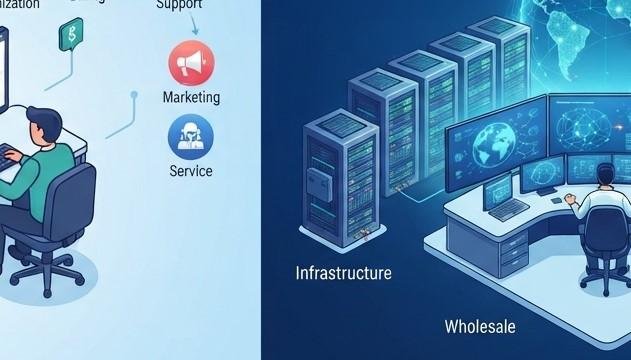
If you are researching the IPTV industry, you may come across terms such as reseller panel, provider panel, main panel, or administrator panel. Although these terms sound similar, they can describe very different levels of control and responsibility.
Understanding the difference is important whether you are interested in managing IPTV subscriptions as a business or simply want to understand how IPTV services are organized behind the scenes.
For customers interested in IPTV India, the distinction can also help explain why one company may provide the underlying service while another company handles customer subscriptions. Similarly, an Indian IPTV Box is a viewing device, while a reseller or provider panel is an administrative system used to manage subscriptions and services.
This guide explains the differences in simple terms.
Table of Contents
-
What Is an IPTV Panel?
-
What Is a Reseller Panel?
-
What Is a Provider Panel?
-
How Does a Reseller Panel Work?
-
How Does a Provider Panel Work?
-
Reseller Panel vs. Provider Panel
-
Who Uses Each Type of Panel?
-
What Can You Manage With a Reseller Panel?
-
What Does a Provider Usually Control?
-
Why Does the Difference Matter?
-
How Does This Relate to an Indian IPTV Box?
-
What Should You Check Before Choosing a Service?
-
FAQs
-
Final Thoughts and CTA
1. What Is an IPTV Panel?
An IPTV panel is generally a web-based administrative interface used to manage IPTV-related accounts, subscriptions, access, or other service functions.
It is important to understand that an IPTV panel is not the same thing as IPTV itself.
IPTV refers to delivering television content through internet networks. A panel, on the other hand, is a management tool used behind the scenes.
Depending on the system, a panel may allow an administrator or reseller to:
-
Create customer accounts
-
Manage subscription periods
-
Renew accounts
-
Monitor account status
-
Manage connection limits
-
Organize packages
-
Review available account information
-
Manage reseller permissions
The exact features vary between providers and platforms.
2. What Is a Reseller Panel?
A reseller panel is typically a dashboard provided to a reseller so they can manage customers without directly operating the underlying IPTV infrastructure.
Think of it as a business management interface.
A reseller may use the panel to create customer subscriptions, manage renewals, view active accounts, and perform other tasks permitted by the upstream provider.
In many systems, resellers purchase credits or subscription capacity from an upstream provider and use those resources to activate customer accounts. However, the exact credit system and permissions can vary significantly between providers.
A reseller panel generally does not mean that the reseller owns the entire streaming infrastructure.
Instead, the basic relationship can look like:
Provider → Reseller → Customer
The provider supplies the underlying service, while the reseller manages customers and may provide sales and support.
3. What Is a Provider Panel?
A provider panel generally refers to a higher-level administrative system used by the organization operating or managing the underlying IPTV service infrastructure.
The provider may have broader control over areas such as:
-
Service configuration
-
Servers or delivery infrastructure
-
Channel organization
-
User management
-
Access permissions
-
Reseller accounts
-
System-level settings
-
Technical monitoring
The exact capabilities depend on the provider's technology and business model.
A provider may also give selected resellers access to a separate dashboard with fewer permissions.
This is why the terms "provider panel" and "reseller panel" should not automatically be treated as interchangeable.
4. How Does a Reseller Panel Work?
A typical reseller workflow can be relatively simple.
Step 1: The Reseller Gets Authorized Access
The provider gives the reseller access to a management dashboard according to their agreement.
Step 2: The Reseller Receives Available Resources
Depending on the provider, this might involve credits, subscription capacity, packages, or another allocation system.
Step 3: A Customer Purchases a Subscription
The reseller handles the customer's order according to their own business process.
Step 4: The Reseller Creates or Activates the Account
The reseller uses the panel to create the customer's subscription or activate an existing plan.
Step 5: The Customer Receives Access
The customer receives the information needed to use their authorized service through a compatible application or device.
Step 6: The Reseller Manages the Account
The reseller may be able to renew, suspend, or update the account depending on the permissions provided by the upstream provider.
The panel therefore acts as the reseller's operational dashboard rather than being the television service itself.
5. How Does a Provider Panel Work?
A provider-level panel generally operates at a broader level.
Instead of managing only a reseller's customers, it may be used to manage the service infrastructure and the different accounts connected to it.
For example, a provider may manage:
-
Reseller accounts
-
Customer access
-
Packages
-
Service resources
-
System settings
-
Authentication
-
Technical monitoring
-
Administrative permissions
A provider can therefore have a much broader view of the overall operation.
This distinction is similar to the difference between a store employee's dashboard and the company's central management system.
6. Reseller Panel vs. Provider Panel
The easiest way to understand the difference is to compare their typical roles.
| Feature | Reseller Panel | Provider Panel |
|---|---|---|
| Primary user | Reseller | Service provider/administrator |
| Main purpose | Manage customers | Manage the wider service |
| Customer management | Usually available | Usually available |
| Subscription management | Usually available | Available with broader controls |
| Reseller management | Usually limited or unavailable | Often available |
| Infrastructure control | Usually limited | Potentially broader |
| System-level settings | Usually restricted | More likely available |
| Branding | May be available | Usually controlled at provider level |
| Access permissions | Limited | Broader |
| Technical responsibility | Usually lower | Usually higher |
These are general distinctions rather than universal rules. Panel features can differ considerably between providers.
7. Who Uses Each Type of Panel?
Reseller Panel Users
Reseller panels are generally designed for businesses or individuals authorized to resell a provider's services.
They may use the dashboard to:
-
Manage customers
-
Activate subscriptions
-
Process renewals
-
Track account status
-
Handle basic customer support
The reseller generally does not need to manage the provider's entire technical infrastructure.
Provider Panel Users
Provider-level panels are more likely to be used by:
-
IPTV service operators
-
Technical administrators
-
System managers
-
Authorized staff
-
Infrastructure teams
Their responsibilities can extend beyond customer accounts into the operation and configuration of the underlying service.
8. What Can You Manage With a Reseller Panel?
The available features depend on the provider, but common functions can include:
Customer Accounts
A reseller can create and manage customer subscriptions.
Renewals
Expiring accounts can often be renewed through the dashboard.
Subscription Duration
Some systems allow resellers to select different subscription periods.
Connection Limits
Where supported, the reseller may be able to specify how many simultaneous connections a customer's plan permits.
Account Status
The reseller can typically view active, expired, or suspended accounts.
Credits
Credit-based systems may show how many resources the reseller has remaining.
These features are not guaranteed. Before paying for reseller access, ask the provider exactly what the panel includes.
9. What Does a Provider Usually Control?
A provider generally has greater responsibility for the underlying service.
Depending on its setup, the provider may control:
-
Core infrastructure
-
Service configuration
-
Channel sources and organization
-
System authentication
-
Reseller permissions
-
Account limits
-
Technical support
-
Platform security
-
Infrastructure maintenance
The provider also determines what a reseller is allowed to do.
For example, a reseller may be able to create customer accounts but have no access to server configuration.
This separation can help prevent inexperienced users from accidentally changing critical system settings.
10. Why Does the Difference Matter?
Understanding the difference matters for both resellers and customers.
It Clarifies Responsibility
If a customer experiences a technical problem, the reseller may provide first-level support while the provider handles infrastructure-related issues.
It Helps Resellers Choose Wisely
Someone considering a reseller arrangement should understand exactly what they are purchasing.
A panel with many buttons does not necessarily mean the reseller has full control over the service.
It Helps Avoid Misunderstandings
A reseller may not control channel availability, server infrastructure, or technical issues.
These responsibilities may remain with the upstream provider.
It Helps Evaluate Business Arrangements
Before entering an agreement, a reseller should understand:
-
Who owns or operates the infrastructure?
-
What permissions does the reseller receive?
-
How are subscriptions managed?
-
What support is available?
-
Are there documented terms?
-
What happens if the provider changes its service?
A panel should be evaluated based on its actual documented capabilities rather than its name.
11. How Does This Relate to an Indian IPTV Box?
An Indian IPTV Box is completely different from a reseller or provider panel.
The IPTV box is a consumer device used to access compatible television services on a TV.
A panel is an administrative system used behind the scenes.
For example:
Provider → Reseller Panel → Customer Subscription → IPTV Application/Device → Television
The exact architecture varies, but the important distinction is that the customer normally interacts with the viewing application or device, not the reseller's administrative panel.
If you are using an IPTV India service as a viewer, you generally do not need to understand reseller panels to watch your authorized channels.
12. What Should You Check Before Choosing a Service?
Whether you are a customer or considering becoming a reseller, don't choose a service based only on the word "panel."
Instead, ask practical questions.
For Customers
Check:
-
What channels are included?
-
Which devices are supported?
-
What customer support is available?
-
What subscription terms apply?
-
Is the provider authorized to distribute the content?
-
What are the service's privacy and account policies?
For Resellers
Ask:
-
What exactly does the reseller panel allow?
-
How are credits or subscriptions calculated?
-
Are there account limits?
-
What happens when a subscription expires?
-
Who handles technical problems?
-
What support does the upstream provider provide?
-
Are the business terms documented?
-
What content and services are you authorized to resell?
A professional arrangement should make these details clear before you commit.
FAQs
1. What is an IPTV reseller panel?
An IPTV reseller panel is an administrative dashboard that allows an authorized reseller to manage customer subscriptions and related account functions provided by an upstream service.
2. What is a provider panel?
A provider panel is generally a higher-level administrative system used by the service provider to manage broader aspects of the IPTV operation, including infrastructure, accounts, permissions, and reseller access.
3. Is a reseller panel the same as a provider panel?
No. A reseller panel normally provides a more limited set of functions for managing customers, while a provider-level panel may provide broader administrative and technical controls.
4. Can a reseller control the IPTV servers?
Usually, a reseller does not have the same infrastructure-level control as the provider. The exact permissions depend on the agreement and panel.
5. Does an Indian IPTV Box include a reseller panel?
No. An Indian IPTV Box is a consumer-facing device for accessing compatible television services. A reseller panel is a separate administrative system.
6. Do IPTV customers need to use a reseller panel?
Generally, no. Customers normally use an IPTV application, supported smart TV, streaming device, or IPTV box to access their subscription.
7. What are IPTV credits?
Credits are a resource used by some reseller programs to activate or renew customer subscriptions. The value and rules for credits vary by provider, so they should be confirmed before purchase.
8. Can a reseller panel manage multiple customers?
Yes. Managing multiple customer subscriptions is one of the primary purposes of a reseller panel.
9. Does every reseller panel have the same features?
No. Features and permissions vary between providers. A reseller should verify the exact functions included before purchasing access.
10. Is a panel itself an IPTV service?
No. A panel is a management tool. The underlying IPTV service involves the systems and content delivery infrastructure that provide the television service.
Final Thoughts
Understanding the difference between a reseller panel and a provider panel makes the IPTV business structure much easier to understand.
A reseller panel is generally designed to help an authorized reseller manage customer subscriptions, renewals, and other permitted account functions. A provider panel operates at a broader administrative level and may provide access to infrastructure, service configuration, reseller management, and other system-level functions.
For viewers, the distinction is simpler. When using IPTV India, you normally interact with the customer-facing service rather than the administrative panel. An Indian IPTV Box is simply one possible device for accessing compatible IPTV services.
If you are considering a reseller arrangement, always verify the provider's terms, permissions, support, and content-distribution rights before making a commitment.
CTA
Want to learn more about IPTV services, devices, and subscription management? Explore IPTV India options, understand how different IPTV systems work, and learn how an Indian IPTV Box can fit into a modern home entertainment setup. Choose legitimate services and providers with clear terms, reliable support, and appropriate authorization for the content they distribute.

 Arabic
 French
 Spanish
 Portuguese
 Deutsch
 Turkish
 Dutch
Dutch
 Italiano
 Russian
 Romaian
 Portuguese (Brazil)
 Greek
Greek